Skip to content

Cultivation management software

Another run that should have turned out better?

Stay on top of this crop. Learn from every run.

Schedule the week’s work in minutes. The crew executes the plan. You get notified of progress and what needs your attention. Daily work builds the data to help you improve every run.

Start with one current batch. Explore the examples without signing up.

The working week

Give the crew a plan they can follow.

Recorded in the actual app with demonstration crops.

See the crew’s side next
Built and used in a commercial Michigan grow.One grower. A full crew. Multiple facilities.

01 / Make the plan

A week’s work. A whole crop.
Both planned in minutes.

The crop calendar becomes the crew’s work plan. Put the right jobs on the right days and choose who is responsible.

Plan this week’s work.

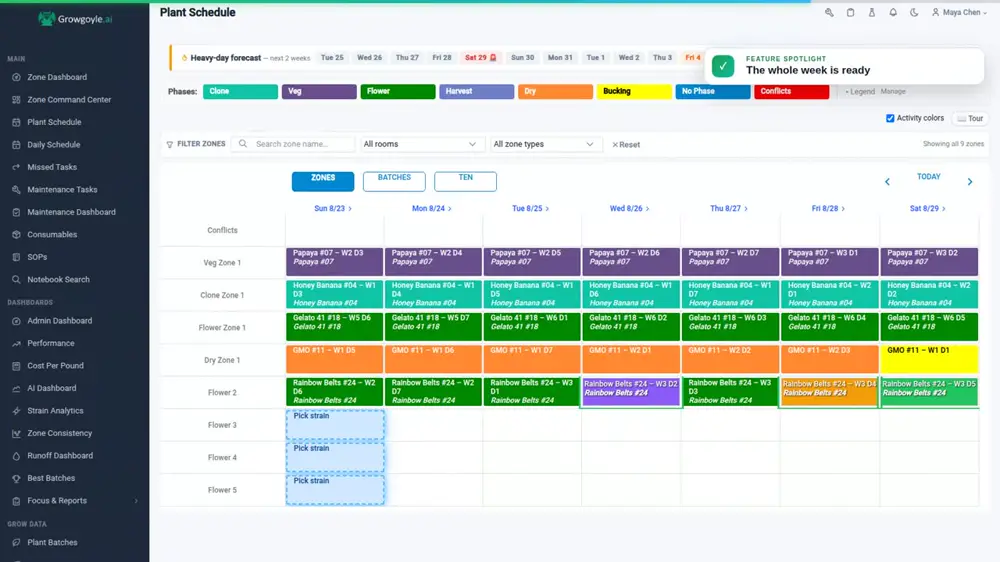
Scouting, defoliation, photos, and everything else. Pick the days, assign your people, and see the week together.

Actual weekly scheduling view with crop phases, scouting, defoliation and canopy-photo work on one calendar.
Watch a week get scheduled · 0:36

Plan your next crop.

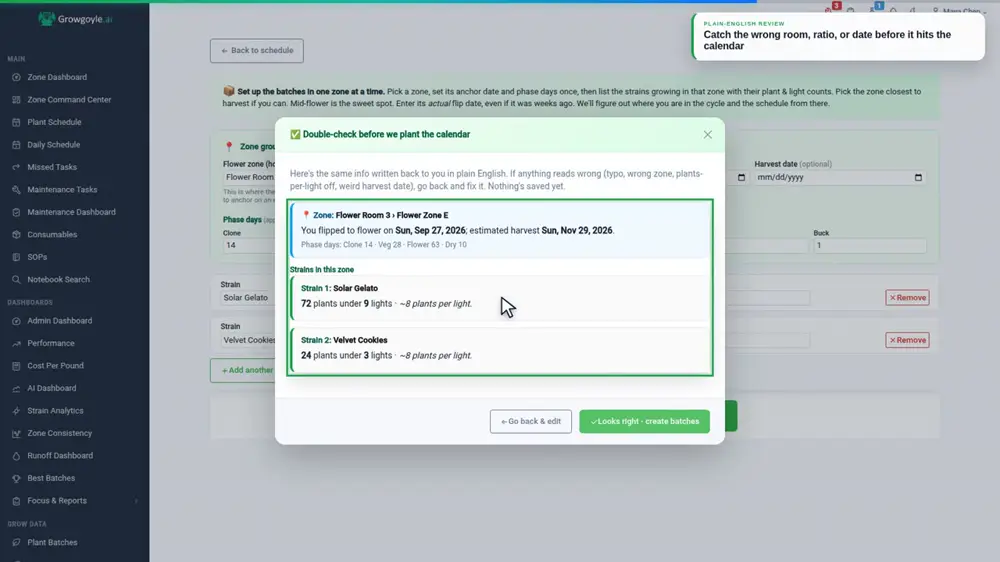
Choose your room, cultivars, and flip date. Use your saved timing, review the plan, and put the crop on the calendar.

Actual crop-planning review confirming the room, cultivar mix, plant counts, flip date and estimated harvest before creating batches.
Explore crop stages and planned work

Real product screens from the Growgoyle tutorial library. The live demo opens selected screens in the actual app with fictional facility data. Work with your own crops in your trial account.

02 / Run the day

Know what got done.
See what needs you.

Get notified when jobs are completed. Daily Focus brings today’s work, missed jobs and crop concerns together so you can see what needs you and assign the next check.

  • Your people know their work.
    Find assigned work on a phone, log progress, and keep moving. Completion history and notes stay with the job.
  • Maintenance stays in the picture.
    Keep meter calibration, drains, and recurring routines on the schedule.

“My crew loves how easy it is to use. They can show up, see what needs doing, and get to work.”

Eric Klamer · Growgoyle founder & commercial grower
On using Growgoyle with his own crew in Michigan.
Preview the crew’s daily work

Try it with one crop and work already on your list. See your first week →

Assign → Complete → ReviewReal app. Two roles. One saved record.

Fictional crop and crew. A labeled time cut skips the room check; the manager refreshes to see the completed job. See the four screens →

See the recurring-maintenance walkthrough · 0:45

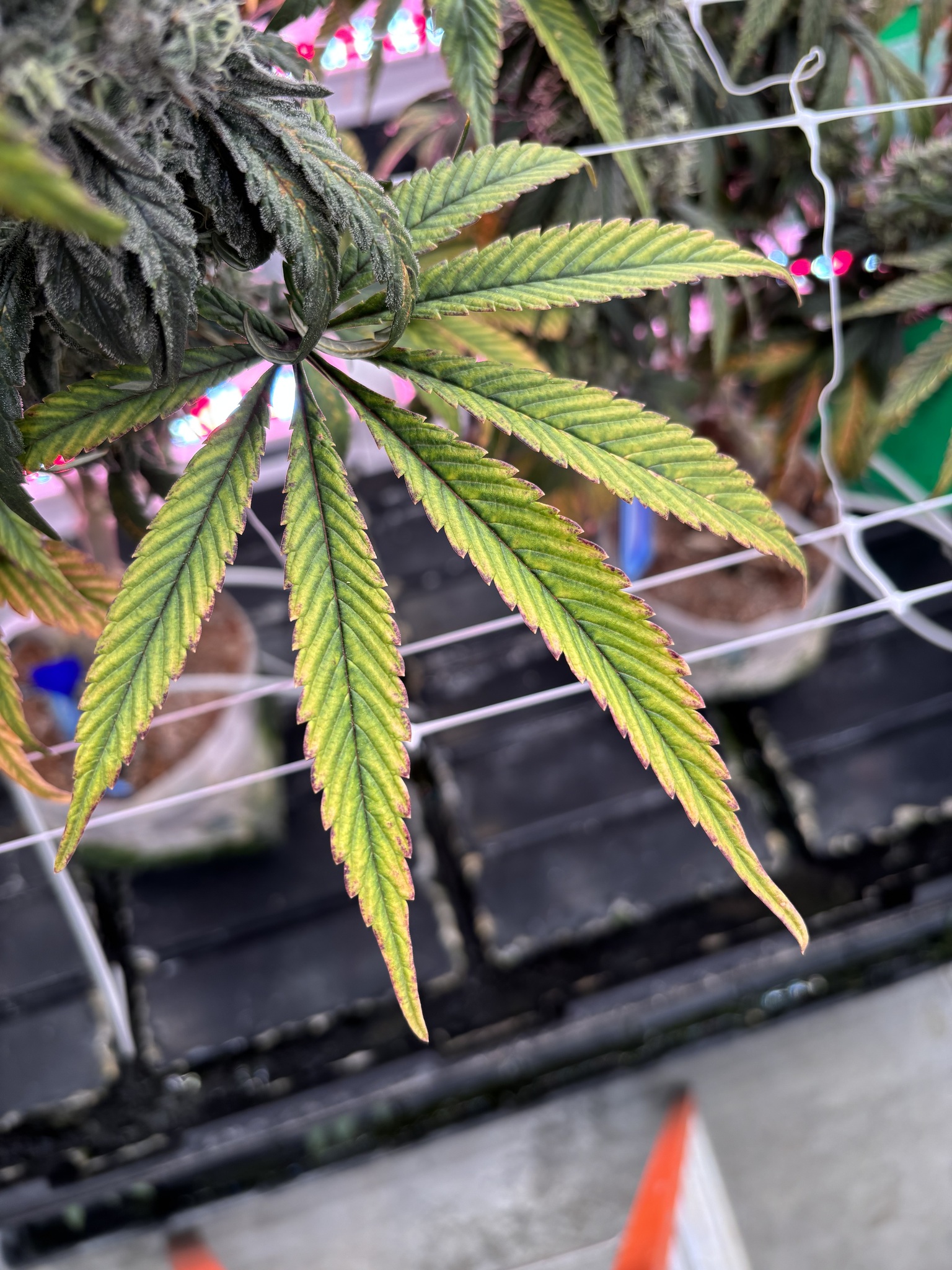
Original Afghan Kush crop photo showing yellowing between leaf veins and brown leaf margins. Afghan Kush · Flower day 51

Photo + crop history

Before you change the feed.

History + current readings
Earlier problems with Parts A and C dosing.
Runoff EC: 3.20–3.57 mS/cm.
The suggested check
Verify pump output and EC/pH at the drippers before changing the recipe.

Condensed from a recorded AI observation. The cause still needs checking.

Read the full example
See the room record
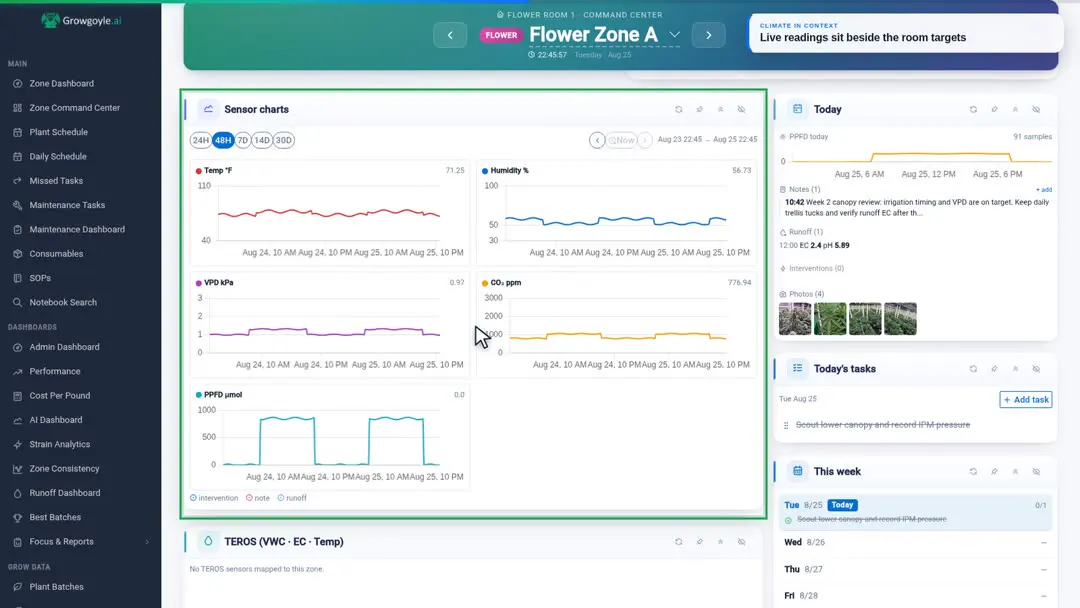
Actual room view keeping sensor trends, grow notes, runoff, photos and assigned work together.
Room context, crop records and the crew’s work in one place.

03 / Photos + crop context

Keep the finding
with the crop.

A photo raises a question. The crop’s notes and readings help you decide what to check. Assign the work, record what the crew finds, and keep it available for the next shift and the next run.

Feed & runoffEnvironmentPhotos & observationsTasks & interventionsHarvest weightsLab results
Preview a room’s work

Your sensors stay. Your controllers stay.
Your data finally has a home.

Connect directly to supported sensor brands, or import readings by CSV. Keep the data together with your work, photos, and crop records.

Direct connections: Pulse, TrolMaster, and AROYA. Supported devices and account access vary by provider. Watch the room walkthrough · 0:41

Keep recording when the signal drops.

On previously opened capture screens, PPFD, environmental readings, runoff, notes, photos, and interventions can be queued on the device and posted when Growgoyle reconnects. Scheduling changes, task actions, analysis, and pages that have not been opened still require a connection.

04 / Learn from the run

Harvest tells you the result.
The record helps explain it.

Pull up two runs at the same stage, even when they’re months apart. Review what changed in the work and the crop. AI helps connect the recorded differences to outcomes and surface questions worth investigating.

  • Compare while it still matters.
    See this crop beside a previous run, week by week.
  • Keep what you learn.
    Choose a useful change, put it on the schedule, and review what happens. Keep the lessons that help the next crop.
See an illustrative run comparison →
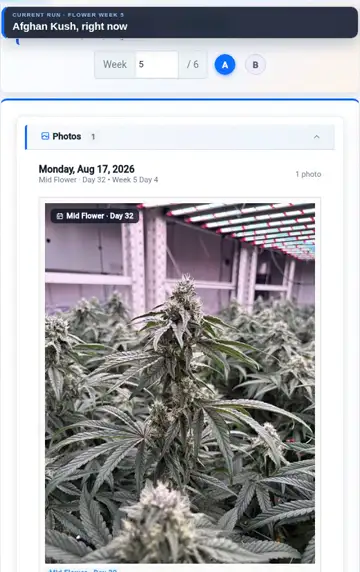
The current run
Actual comparison tutorial showing the current Afghan Kush crop at flower week five, with its dated crop photo.
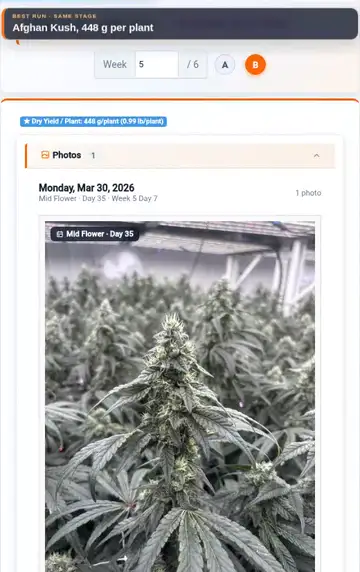
A previous run
Actual comparison tutorial showing an earlier Afghan Kush run at the same flowering stage, with its photo and recorded yield.

Same cultivar. Same week of flower. Demo crop data.

From a real completed run

Good lab results.
Disappointing structure.
What happened along the way?

The lab results looked good. Density didn’t. AI brought the operator’s dosing note together with feed and runoff records, environmental changes and finished quality.

The interruption was already known. The useful part was reviewing the wider record and choosing checks for the next run, while keeping the drying work that went well.

See the completed-run analysis How Growgoyle handles evidence and uncertainty →

Condensed from a real completed-run analysis

Next check: verify dosing at flip

Cultivar A · first tracked run · 90 plants · 24 lights

What was recorded
An operator note recorded that Part A dosing was off for the first 10 days after flip.
What the run showed
A 2.55 lb/light baseline with weak density. Later feed averaged roughly 32% above the recorded recipe target, and runoff EC rose through flower.
What limits the conclusion
Early heat, VPD, and a new propagation source overlapped the dosing interruption. This first tracked run cannot isolate their effects.
What to review next
A day-of-flip dosing verification checklist to keep the documented miss from recurring.

Possible contributor, not causal proof. The record documents the interruption, not how much yield it cost.

Editorially condensed; not the in-app report layout. Names and select values changed for privacy. The full report includes score breakdowns, strengths, opportunities, phase analysis, and data-quality notes.

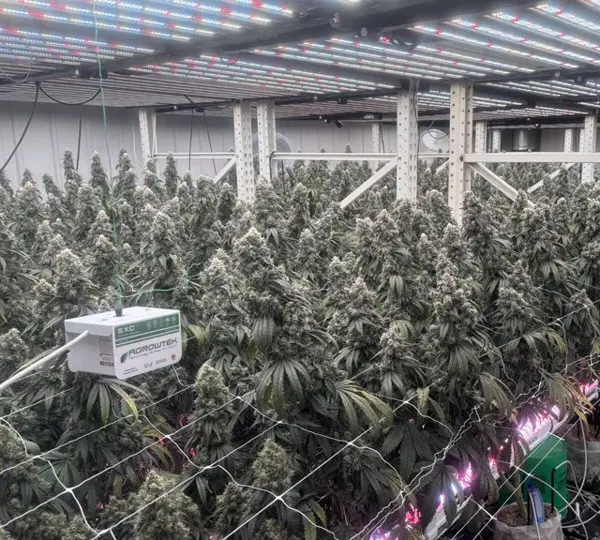
Eric’s commercial Michigan cultivation facility, with crop canopy, irrigation and existing sensors under grow lights.
Eric’s commercial cultivation facility · Michigan

Engineering & cultivation

Software engineer.
Commercial grower.

Eric Klamer · Founder

Senior software engineer & integration specialist

I work on MAGI ERP, designing manufacturing workflows and business-system integrations, with a background in hardware systems and IT. I also operate a commercial cultivation facility in Michigan.

I bring that experience to building, hosting, and maintaining Growgoyle for the work we do every day.

One product. Simple facility pricing.

The whole platform.
Start with one crop.

Start with one crop and this week’s work. See whether your crew can follow the plan and you can keep up without chasing updates.

See what goes into your first week →
Unlimited rooms, zones, plant batches, cultivars, and users.The complete Growgoyle platform is included: planning, daily work, maintenance, crop records, harvests, SOPs, consumables, purchasing, and analysis.

Use the crop record for completed-run analysis, side-by-side comparisons and useful next checks.

$499 / month

per active facility

Or $5,389/year per active facility. Save 10%.

Start your 30-day trial

Complete product access. No credit card required.

Each additional active site is billed at the same rate. Compute-intensive AI has a pooled per-facility reasonable-use allowance.

An active facility is one independently operated physical cultivation site. Need implementation help or a portfolio rollout? Talk directly with Eric about a custom agreement.

Getting started

A few things you might be wondering.

Do I need to set up the whole operation at once?

No. Start with one crop, a few tasks, or a maintenance routine. The guided setup lets you skip anything you are not ready for. Add more rooms, teammates, and workflows as you get comfortable. You can get started without importing old records or connecting sensors.

Who builds and maintains Growgoyle?

Growgoyle is built and maintained by Eric Klamer, a senior software engineer and integration specialist with a background in hardware systems and IT. Eric works on MAGI ERP, designing manufacturing workflows and business-system integrations, and operates a commercial cultivation facility in Michigan. He brings that experience to developing, hosting, and maintaining Growgoyle. Learn more about Eric and his work.

Do I have to wait for the next crop?

No. Start with one room already in flower. Add a current crop to put its schedule in place, then add records as you and your team work. Scheduling, coordination, maintenance, and accountability are useful as soon as the facility is set up; you don’t need to wait for a completed-run analysis.

What if I’m the whole team?

You still have crops to plan, work to remember, equipment to maintain, and results to learn from. Start with the parts you need. You can add people without adding per-user charges.

Can I use it across multiple facilities?

Yes. Multi-facility operators can grant site-specific access, switch facilities from one login, and keep each facility’s operational record isolated. Every subscription includes unlimited team members and role-based access. Each independently operated physical cultivation site is billed separately.

What parts of the operation can Growgoyle run?

Growgoyle covers crop and room scheduling, daily and recurring work, assignments, timers, completion and missed-task history, preventive-maintenance schedules, SOPs, consumables and purchasing, environmental and irrigation records, alerts, harvests, labor and performance reporting, and multi-facility team access. It is not payroll, accounting, sales, or a general-purpose ERP. Keep those business systems where they already work and use Growgoyle to run the grow.

Does it work with my existing sensors and controllers?

Yes. Growgoyle offers direct connections for supported Pulse, TrolMaster, and AROYA devices and accounts, plus CSV imports for supported formats including Agrowtek, METER, and Sensaphone. Availability depends on the device and provider access. Your controller keeps controlling; Growgoyle brings the readings into the crop record. Ask Eric about your setup.

What happens when facility Wi-Fi drops?

Previously opened pages may remain available from the app’s local cache. On supported capture screens, PPFD, environmental readings, runoff, notes, photos, and interventions can be queued on that device and posted when Growgoyle reconnects. The Pending Sync screen shows anything still waiting. Offline support does not cover the whole app: scheduling changes, task actions, analysis, and pages that have not been opened require connectivity.

Where does AI fit in?

During the run, Daily Focus brings crop context and suggested checks to your attention. Photo analysis gives you a second look at visible symptoms and available batch records. Review a useful suggestion and turn it into assigned work. Afterward, run analysis and comparisons help connect what happened with the result. The grower checks the evidence and chooses the response. See the workflow, a contextual photo observation or the completed-run analysis.

What can I learn during the 30-day trial?

Start with one current batch and a week’s work. Assign the jobs, let the crew log progress, and turn on phone notifications. Can the crew follow the plan? Can you keep up without chasing updates, and see what still needs attention? See what goes into your first week. The work your crew records builds the crop history. AI comparisons become more useful as history grows; completed-run analysis needs a finished crop record. Eric can help choose a starting workflow. Data migration, training across sites and ongoing implementation help are scoped separately.

Does Growgoyle prove what caused a result?

No. An observational cultivation record rarely isolates one variable well enough to prove causation. Growgoyle identifies plausible contributors and shows evidence that supports or weakens each interpretation. Modeled opportunity is not a forecast. The operator decides what to change. Read the analysis methodology.

How does facility pricing work?

One independently operated physical cultivation site is one billing unit at $499/month or $5,389/year. Rooms, buildings, licenses, zones, benches, cultivars, plant batches, users, and historical runs at one integrated site do not create extra units. Creating or reactivating a site on a paid subscription shows the exact prorated charge and requires billing approval; the site becomes operational only after payment succeeds. Deactivating a site preserves history and lowers the next renewal without a mid-cycle refund or credit. Reactivating that paid unit before renewal does not charge for it twice.

Can I see it without talking to sales?

Yes. Explore the interactive demo or read the completed-run analysis without signing up. To create plans and try workflows with your own crop data, start a 30-day trial. No credit card required.
Make this week easier.
Keep learning from the crop.

Follow a crop concern in the app

Put one crop and a few important jobs on the calendar. Walk through it with Eric →