Matched to your answers
Crop and room schedules
Keep scheduled work attached to the correct facility, room, batch, phase, and day.
Turn the time you already spend maintaining schedules, assigning work, following up, and reconciling records into a transparent annual planning estimate.
This is not an industry benchmark. Enter the time and workflow your team actually uses. A spreadsheet may still be workable for a small, simple operation, and the calculator can say so.
A record touch means one place your team says it must manually update. It is not assumed to be an error or a loss. It is simply coordination work.
The highlighted cards match the workflow you described. Every capability below is available in Growgoyle today.
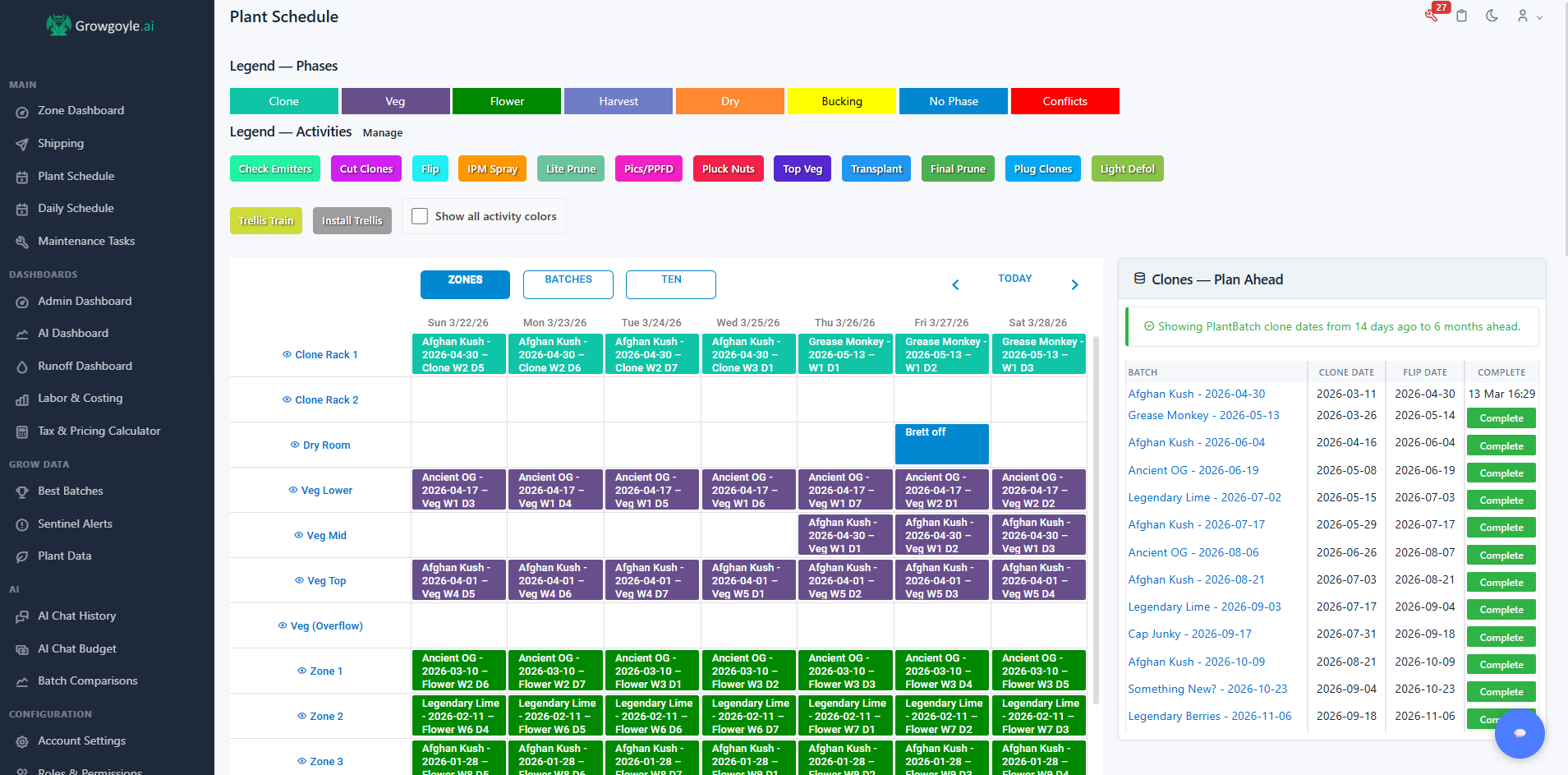
Growgoyle builds the operational schedule around the facility, rooms, batches, phases, and work the team is actually running.
The same schedule can be displayed on a shared team screen.Keep scheduled work attached to the correct facility, room, batch, phase, and day.
Coordinate priorities, assignments, reusable work, timers, and mobile completion from the operating plan.
Keep recurring due dates, assignees, urgency, snoozes, reminders, and completion history beside crop work.
See completed, overdue, deferred, missed, and unassigned work without reconstructing status from memory.
Keep conditions, irrigation and runoff, observations, incidents, work, maintenance, harvest, and outcomes in context.
Give people site-specific access, switch facilities from one login, and keep each operational record isolated.
The calculator deliberately stays close to the values you know. It does not claim that a spreadsheet caused a crop outcome.
(Weekly schedule-maintenance hours + weekly assignment and reconciliation hours) × 52.
Annual self-reported coordination hours × the loaded hourly cost you choose to enter.
Schedule changes per month × records updated per change × 12. A touch is not assumed to be a mistake.
A labeled planning heuristic using rooms, team size, shifts, facilities, manual hours, change frequency, record count, and selected workflow gaps. It is not a validated industry benchmark.
This is the actual Growgoyle scheduling workflow, not a mockup. Build the crew plan on the crop calendar and assign the work the room needs.
Build the crew plan on the crop calendar and assign defoliation, scouting, and canopy-photo work.
Videos connect to YouTube only after you press play. Privacy details
Preview today’s work, who owns it, and a few current crops using fictional facility data. Book a walkthrough to explore the full workflow.
No. It prices the coordination time you reported. Some of that work remains necessary in any system, and software may reduce only part of it. Treat the result as a way to understand the current process, not a savings guarantee.
No. It does not assign yield, quality, downtime, or revenue effects to your scheduling method. Those conclusions require comparable operational records and finished outcomes.
A small operation with few rooms, few editors, low change frequency, and clear completion history may be served well by a carefully maintained spreadsheet. The calculator can return that result.
One manual update to one place your team depends on, such as the crop spreadsheet, daily task list, whiteboard, calendar, group chat, maintenance tracker, or personal notes.
Growgoyle connects crop and room schedules with assigned daily work, completion and missed-task history, preventive maintenance, operational observations, room data, harvest records, and facility-aware access.
Built by a grower, for growers
I'm Eric: software engineer, commercial grower in Michigan. I built these tools for my own operation. Tracking everything in spreadsheets and carrying it all in my head wasn't working, so I built Growgoyle. It runs my operation every day and it can help you run yours.
Text me at 616-221-9856 or email info@growgoyle.ai if you want to talk about it.