Skip to content

Cultivation management software

Run your
entire grow
in one place.

Plan your crops and your week in minutes. Keep your people, maintenance, room records, and harvest results connected, without piecing everything together from spreadsheets and group texts.

Start with one useful workflow. You don’t need to adopt the whole system at once. Add more when you’re ready.

Explore a real facility. View-only demo. No signup required.

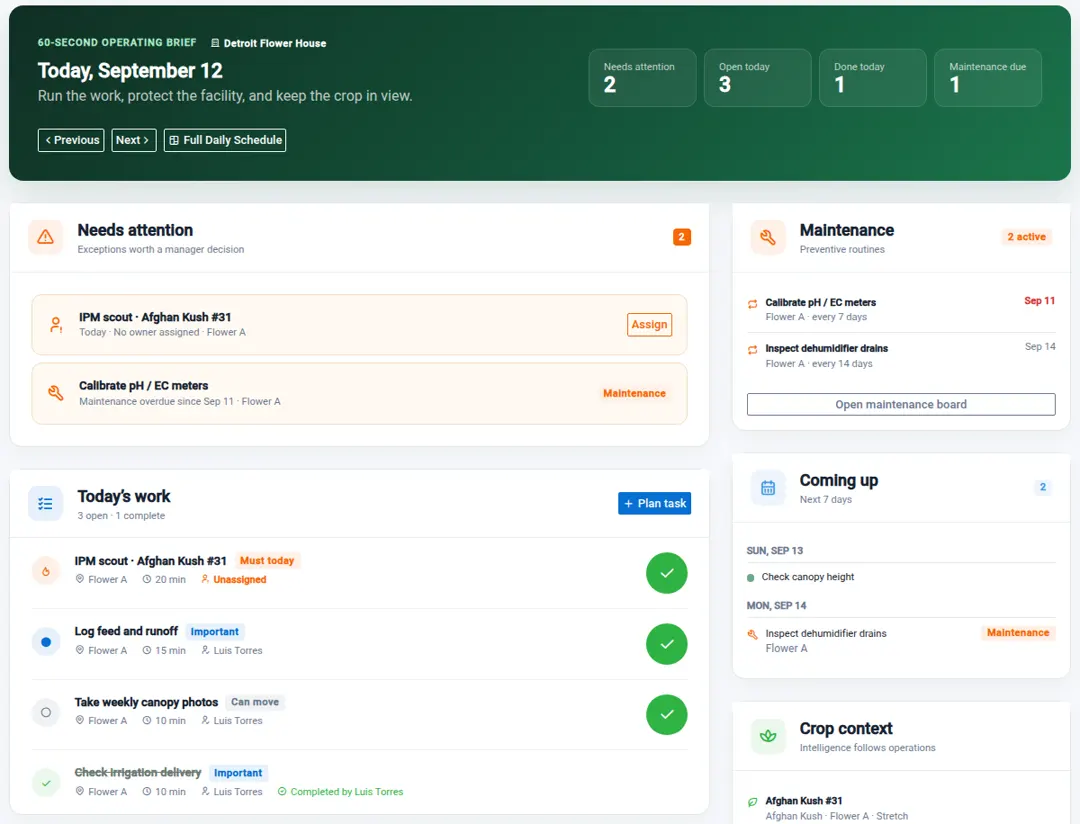
Start the day with the whole pictureActual app · demo data
Growgoyle Daily Focus showing today's work and owners, attention needed, recurring maintenance, upcoming work, and crop context.
Daily Focus. Your people, your facility, and the crop in view.
Built and used in a commercial Michigan grow.One grower. A full crew. Multiple facilities.

01 / Make the plan

A week’s work. A whole crop.
Both planned in minutes.

Start with the room and the crop. The schedule and the work belong together.

Plan this week’s work.

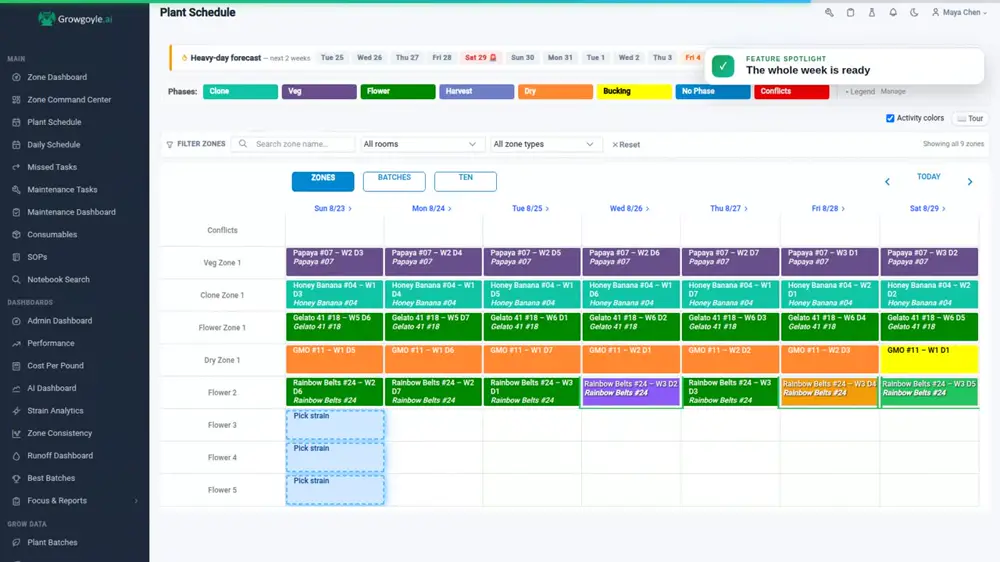
Scouting, defoliation, photos, and everything else. Pick the days, assign your people, and see the week together.

Actual weekly scheduling view with crop phases, scouting, defoliation and canopy-photo work on one calendar.
Watch a week get scheduled · 0:36

Plan your next crop.

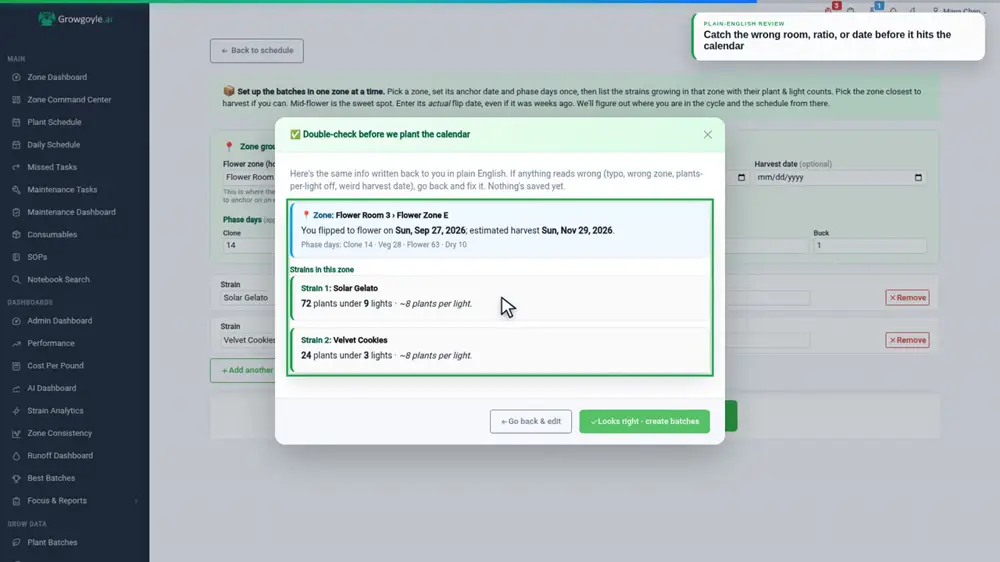
Choose your room, cultivars, and flip date. Use your saved timing, review the plan, and put the crop on the calendar.

Actual crop-planning review confirming the room, cultivar mix, plant counts, flip date and estimated harvest before creating batches.
See the crop schedule · view-only demo

Real product screens from the Growgoyle tutorial library. The public demo is view-only; planning and edits happen in your own account.

02 / Run the day

Know what got done.
See what needs you.

Stop chasing people and group texts for an update. Give the work an owner, see what’s been completed, and keep the crop moving.

  • Your people know their work.
    Assignments, completion history, and notes stay together.
  • Maintenance stays in the picture.
    Keep meter calibration, drains, and recurring routines on the schedule.
See the crew’s daily schedule
Assign → Complete → ReviewReal app. Two roles. One saved record.

See the recurring-maintenance walkthrough · 0:45

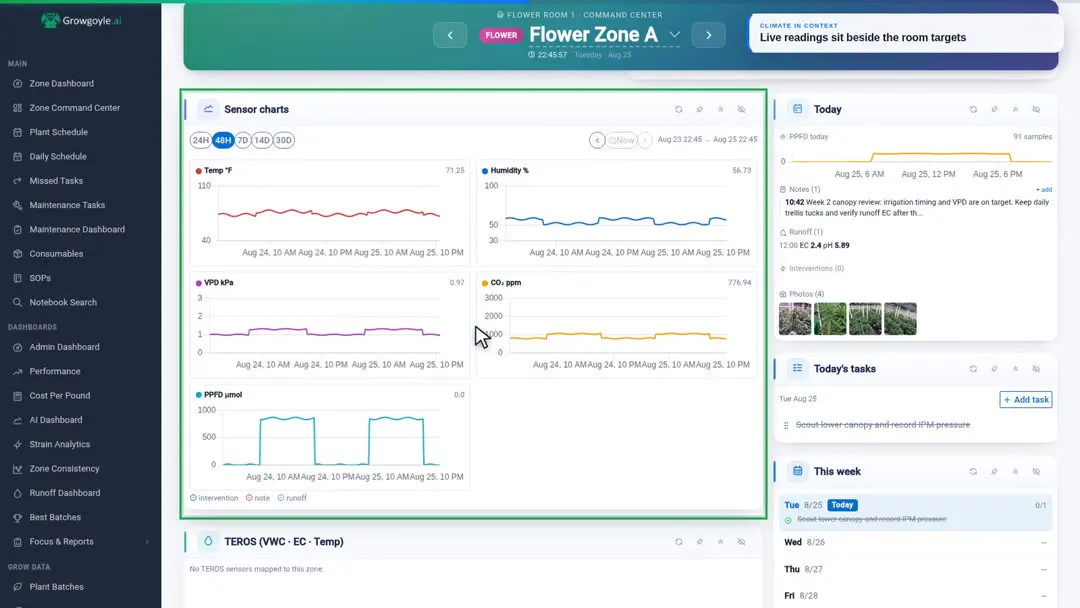
Actual room command center with environmental trends, room notes, runoff, crop photos and scheduled work in one view.
The room’s conditions and the work, side by side. Watch the room walkthrough · 0:41

03 / Keep the whole record

The whole record.
Right with the crop.

The feed sheet, the phone photos, the room notes, the missed task. Keep the details tied to the batch and the day, so you can find them when they matter.

Feed & runoffEnvironmentPhotos & observationsTasks & interventionsHarvest weightsLab results
Look around a real room

Your sensors stay. Your controllers stay.
Your data finally has a home.

Connect directly to supported sensor brands, or import readings by CSV. Keep the data together with your work, photos, and crop records.

Direct connections: Pulse, TrolMaster, and AROYA. Supported devices and account access vary by provider.

Keep recording when the signal drops.

On previously opened capture screens, PPFD, environmental readings, runoff, notes, photos, and interventions can be queued on the device and posted when Growgoyle reconnects. Scheduling changes, task actions, analysis, and pages that have not been opened still require a connection.

04 / Learn from the run

Harvest tells you the result.
The record helps explain it.

Pull up two runs at the same stage. Review what changed, connect the harvest and lab results to the work, and decide what to carry into the next crop.

  • Compare while it still matters.
    See this crop beside a previous run, week by week.
  • Keep what you learn.
    Use photos, run analysis, and investigation leads to inform your next plan and SOPs.
See an illustrative run comparison →
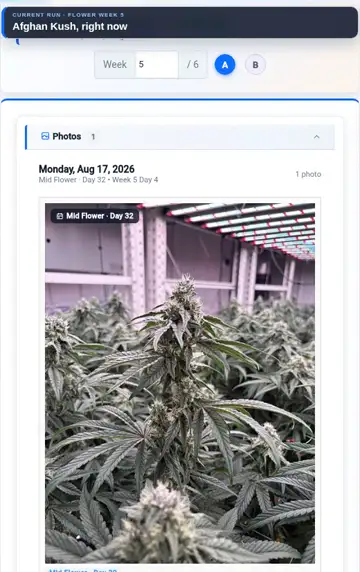
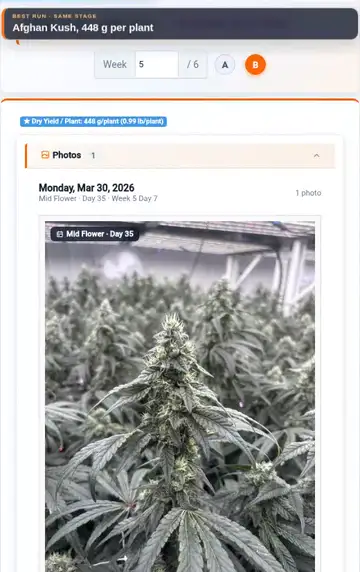
The current run
Actual comparison tutorial showing the current Afghan Kush crop at flower week five, with its dated crop photo.
A previous run
Actual comparison tutorial showing an earlier Afghan Kush run at the same flowering stage, with its photo and recorded yield.

Same cultivar. Same week of flower. Demo crop data.

From a real completed run

What can a complete
crop record reveal?

An operator note documented a dosing interruption. The analysis brought that record together with conditions and harvest results, identified a possible contributor, and explained what the evidence could and couldn’t support.

A comparison shows differences between runs. A completed-run analysis brings the evidence together to help you decide what to repeat, investigate, or change next.

See the completed-run analysis How Growgoyle handles evidence and uncertainty →

Condensed from a real completed-run analysis

Primary lever identified: dosing verification

Cultivar A · first tracked run · 90 plants · 24 lights

What was recorded
An operator note recorded that Part A dosing was off for the first 10 days after flip.
What the run showed
A 2.55 lb/light baseline, with weak density despite solid chemistry and drying execution.
What limits the conclusion
Early heat, VPD, and a new propagation source overlapped the dosing interruption. This first tracked run cannot isolate their effects.
What to review next
A day-of-flip dosing verification checklist to keep the documented miss from recurring.

Possible contributor, not causal proof. The record documents the interruption, not how much yield it cost.

Editorially condensed; not the in-app report layout. Names and select values changed for privacy. The full report includes score breakdowns, strengths, opportunities, phase analysis, and data-quality notes.

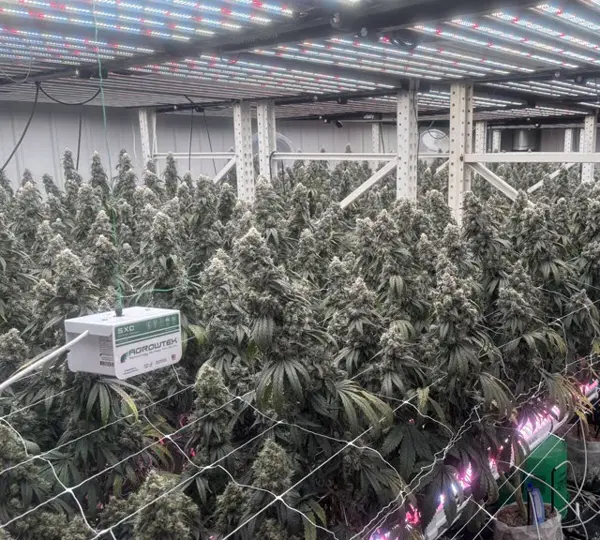
Eric’s commercial Michigan cultivation facility, with crop canopy, irrigation and existing sensors under grow lights.
Eric’s commercial cultivation facility · Michigan

Engineering & cultivation

Software engineer.
Commercial grower.

Eric Klamer · Founder

Senior software engineer & integration specialist

I work on MAGI ERP, designing manufacturing workflows and business-system integrations, with a background in hardware systems and IT. I also operate a commercial cultivation facility in Michigan.

I bring that experience to building, hosting, and maintaining Growgoyle for the work we do every day.

One product. Simple facility pricing.

The whole platform.
For the whole operation.

Whether you’re keeping it all in your head, coordinating a crew, or running multiple sites, start with one room and bring the rest together as you go.

Unlimited rooms, zones, plant batches, cultivars, and users.The complete Growgoyle platform is included: planning, daily work, maintenance, crop records, harvests, SOPs, consumables, purchasing, and analysis.

Synthesize the full record into completed-run analysis, side-by-side comparisons, and investigation leads.

$499 / month

per active facility

Or $5,389/year per active facility. Save 10%.

Start your 30-day trial

Complete product access. No credit card required.

Each additional active site is billed at the same rate. Compute-intensive AI has a pooled per-facility reasonable-use allowance.

An active facility is one independently operated physical cultivation site. Need implementation help or a portfolio rollout? Talk directly with Eric about a custom agreement.

Getting started

A few things you might be wondering.

Do I need to set up the whole operation at once?

No. Start with one crop, a few tasks, or a maintenance routine. The guided setup lets you skip anything you are not ready for. Add more rooms, teammates, and workflows as you get comfortable. You can get started without importing old records or connecting sensors.

Who builds and maintains Growgoyle?

Growgoyle is built and maintained by Eric Klamer, a senior software engineer and integration specialist with a background in hardware systems and IT. Eric works on MAGI ERP, designing manufacturing workflows and business-system integrations, and operates a commercial cultivation facility in Michigan. He brings that experience to developing, hosting, and maintaining Growgoyle. Learn more about Eric and his work.

Do I have to wait for the next crop?

No. Start with one room already in flower. Add a current crop to put its schedule in place, then add records as you and your team work. Scheduling, coordination, maintenance, and accountability are useful as soon as the facility is set up; you don’t need to wait for a completed-run analysis.

What if I’m the whole team?

You still have crops to plan, work to remember, equipment to maintain, and results to learn from. Start with the parts you need. You can add people without adding per-user charges.

Can I use it across multiple facilities?

Yes. Multi-facility operators can grant site-specific access, switch facilities from one login, and keep each facility’s operational record isolated. Every subscription includes unlimited team members and role-based access. Each independently operated physical cultivation site is billed separately.

What parts of the operation can Growgoyle run?

Growgoyle covers crop and room scheduling, daily and recurring work, assignments, timers, completion and missed-task history, preventive-maintenance schedules, SOPs, consumables and purchasing, environmental and irrigation records, alerts, harvests, labor and performance reporting, and multi-facility team access. It is not payroll, accounting, sales, or a general-purpose ERP. Keep those business systems where they already work and use Growgoyle to run the grow.

Does it work with my existing sensors and controllers?

Yes. Growgoyle offers direct connections for supported Pulse, TrolMaster, and AROYA devices and accounts, plus CSV imports for supported formats including Agrowtek, METER, and Sensaphone. Availability depends on the device and provider access. Your controller keeps controlling; Growgoyle brings the readings into the crop record. Ask Eric about your setup.

What happens when facility Wi-Fi drops?

Previously opened pages may remain available from the app’s local cache. On supported capture screens, PPFD, environmental readings, runoff, notes, photos, and interventions can be queued on that device and posted when Growgoyle reconnects. The Pending Sync screen shows anything still waiting. Offline support does not cover the whole app: scheduling changes, task actions, analysis, and pages that have not been opened require connectivity.

Where does AI fit in?

It supports photo analysis and investigation of your crop records. The foundation is your operation: plans, work, maintenance, and records. Analysis helps you investigate what happened; you make the growing decisions. See a contextual photo observation or the completed-run analysis.

Does Growgoyle prove what caused a result?

No. An observational cultivation record rarely isolates one variable well enough to prove causation. Growgoyle identifies plausible contributors and shows evidence that supports or weakens each interpretation. Modeled opportunity is not a forecast. The operator decides what to change. Read the analysis methodology.

How does facility pricing work?

One independently operated physical cultivation site is one billing unit at $499/month or $5,389/year. Rooms, buildings, licenses, zones, benches, cultivars, plant batches, users, and historical runs at one integrated site do not create extra units. Creating or reactivating a site on a paid subscription shows the exact prorated charge and requires billing approval; the site becomes operational only after payment succeeds. Deactivating a site preserves history and lowers the next renewal without a mid-cycle refund or credit. Reactivating that paid unit before renewal does not charge for it twice.

Can I see it without talking to sales?

Yes. Explore the view-only live demo or read the completed-run analysis without signing up. To create plans and try workflows with your own crop data, start a 30-day trial. No credit card required.
See what your grow could look like
with everything in one place.

Explore the live demo

Want to see what the record reveals? See the completed-run analysis →